
Law firm case management software decides how much of a lawyer's day goes into looking for things: the prosecutor's reference number, the next hearing, the signed fee agreement. Standard software covers a lot of this, and for many firms it is the right choice. For others, a custom legal case management system fits better. Below I show what a criminal-defence practice needs every day, how to weigh standard against custom, and what we built in our Defensio project. 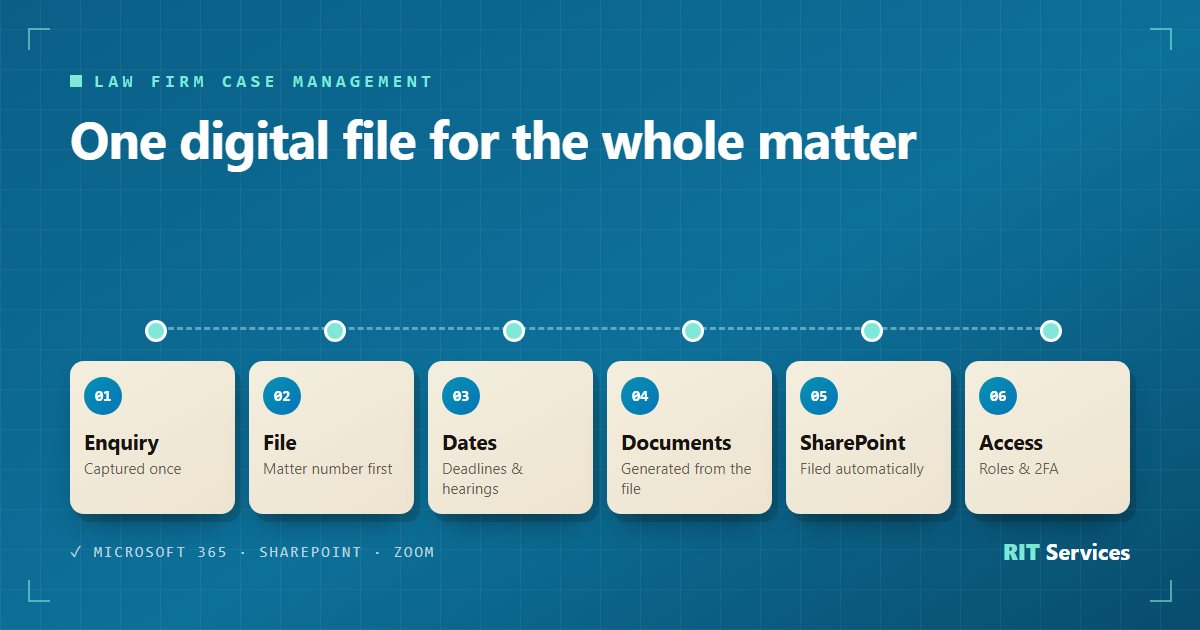
What a criminal-defence practice needs from case management software
Criminal defence is a good test for any case management software for lawyers, because a single matter involves many parties and many dates. A normal day includes:
- Authorities. Police, public prosecutor and court, each with its own location and reference number, which can change as the case moves on.
- Deadlines and hearings. They have to be visible in the file, not only in someone's head or in a separate calendar.
- Documents. Every new client needs a power of attorney and a fee agreement, often an instalment plan as well.
- Availability. Someone in custody or holding a summons cannot wait days for an appointment, so the firm runs an on-call rota.
- Confidentiality. Not everyone in the firm should see every file.
How an enquiry becomes a file in the first place is covered in our article on law firm client intake software. This article starts once the file exists.
One digital file instead of five places to look
The heart of a legal case management system is the file. When it holds the authorities with their references, the deadlines and the hearing dates, nobody has to search through email threads, folders and calendars. Two details made a visible difference in our project:
- A matter number before the case file number. Every enquiry gets an internal number at once. The court's or prosecutor's reference is added when it arrives, and nothing waits for it.
- Authorities as structured data. Location and reference number are fields, not free text, so they can be filled into letters automatically.
Documents generated from the file
Powers of attorney, fee agreements and instalment plans follow the same pattern in almost every matter. Good law firm software generates them from the file instead of having someone copy names and amounts into Word:
- The firm's own Word templates contain placeholders for client, matter, lawyer and firm.
- Before a document is generated, the system checks that every required field is filled in.
- The finished document is filed automatically in the matter's folder, for example in SharePoint.
The lawyer still reads what goes out. The software removes the retyping, not the review.
Microsoft 365, SharePoint and Zoom: connect what the firm already uses
Most firms already work in Microsoft 365. Law firm management software that ignores it creates a second world: a calendar nobody opens and documents stored twice. Connecting it looks like this:
- Outlook: appointments are checked against the lawyers' own calendars, so a court date blocks the slot.
- SharePoint: each matter has its folder, and generated documents land there.
- Zoom: for video consultations, the meeting is created together with the appointment.
- Access: roles for secretariat, lawyers and administrators, plus two-factor sign-in with an authenticator app.
Would you like to know which of these connections would save your team the most time? Book a free initial consultation and we will look at your current setup together.
Standard legal practice management software or a custom build?
For many firms, standard legal practice management software is the right answer: quick to start, maintained by the vendor, paid monthly. A custom build only makes sense when the gap is real. Compare three things:
- Cost. Standard software costs a licence per user and month. A custom build costs a project up front, then hosting and maintenance. It pays off through the hours it saves, not because it is custom.
- Fit. If you adapt your workflow to the software and that works, stay with standard. If your team keeps a form app, a spreadsheet and a second calendar running next to it, the fit is poor.
- Who owns the code. With standard software, the vendor decides what changes and when. With a custom build, you can hold the rights to the source code and choose who maintains it.
We look at this trade-off in more detail in our article on make or buy. If standard software covers your process, we will tell you.
From our Defensio project: why a custom build
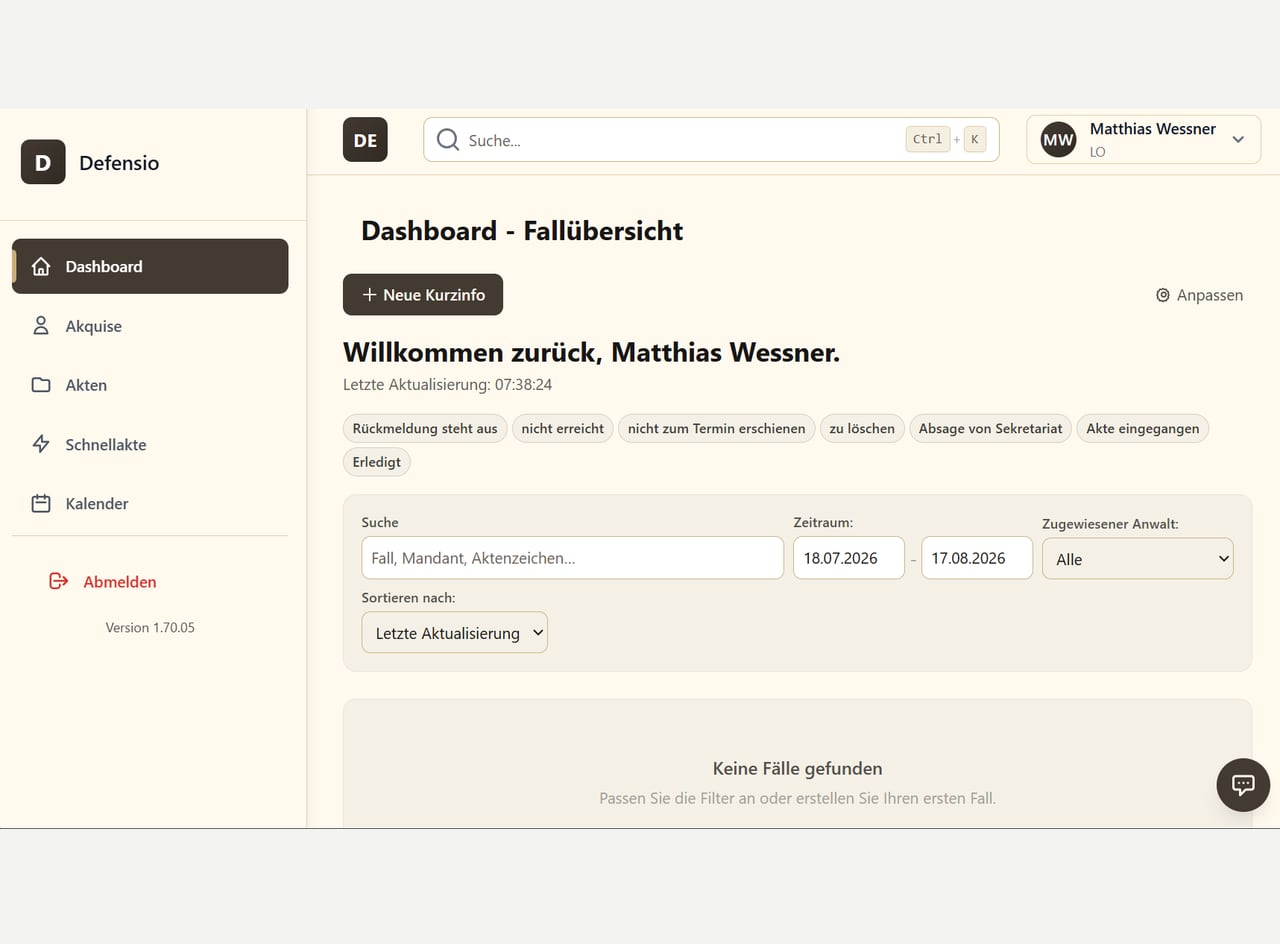
Defensio is the case management software we built for a criminal-defence practice. Before, enquiries were captured in a form app and then copied by hand into the file, the calendar and the documents. The practice needed connections that no single standard tool gave it: an on-call calendar working together with the lawyers' Outlook calendars, authorities with their references in the file, and documents from its own templates filed straight into SharePoint.
Today one web application covers the working day:
- digital files with authorities, deadlines and hearings,
- scheduling from the on-call calendar with an Outlook check, and invitations sent after a preview,
- powers of attorney, fee agreements and instalment plans generated from the file,
- Microsoft 365, SharePoint and Zoom connected,
- role-based access and two-factor authentication.
In client intake, staff effort fell by 50 %, and the investment paid for itself after five months (source: RIT Services, results from real projects). The whole project is described in the Defensio case study.
Where to start
Start with the part of the day that costs the most hours, usually documents or scheduling. A first pilot usually goes live within two to four weeks and grows from there. See how we build software and automation for law firms.
Thinking about custom law firm software? Book a free initial consultation. We will tell you honestly whether standard software is enough.
FAQ: law firm case management software
What is the difference between case management and practice management software?
Case management centres on the matter: file, parties, dates and documents. Practice management usually adds billing, time recording and accounting. Many products combine both.
Does custom case management software replace our billing software?
Not necessarily. A custom system can cover the work on the file and connect to the billing or accounting tools you already use.
Can we keep using Outlook and SharePoint?
Yes. In our Defensio project, appointments are checked against the lawyers' Outlook calendars, and documents are filed in the matter's SharePoint folder.
Who owns the software after a custom build?
That is set out in the contract. You can hold the rights to the source code, so you are not tied to us for maintenance.
How long does a custom build take?
A first pilot usually goes live within two to four weeks. The full scope depends on how many processes and systems are connected.