
Law firm client intake software earns its keep in the hours between a new enquiry and the first appointment. That is where manual hand-offs decide how quickly an enquiry turns into a client, and where legal workflow automation pays off first. Below I show which steps are worth automating and when a custom build makes sense, with an example from our Defensio project. 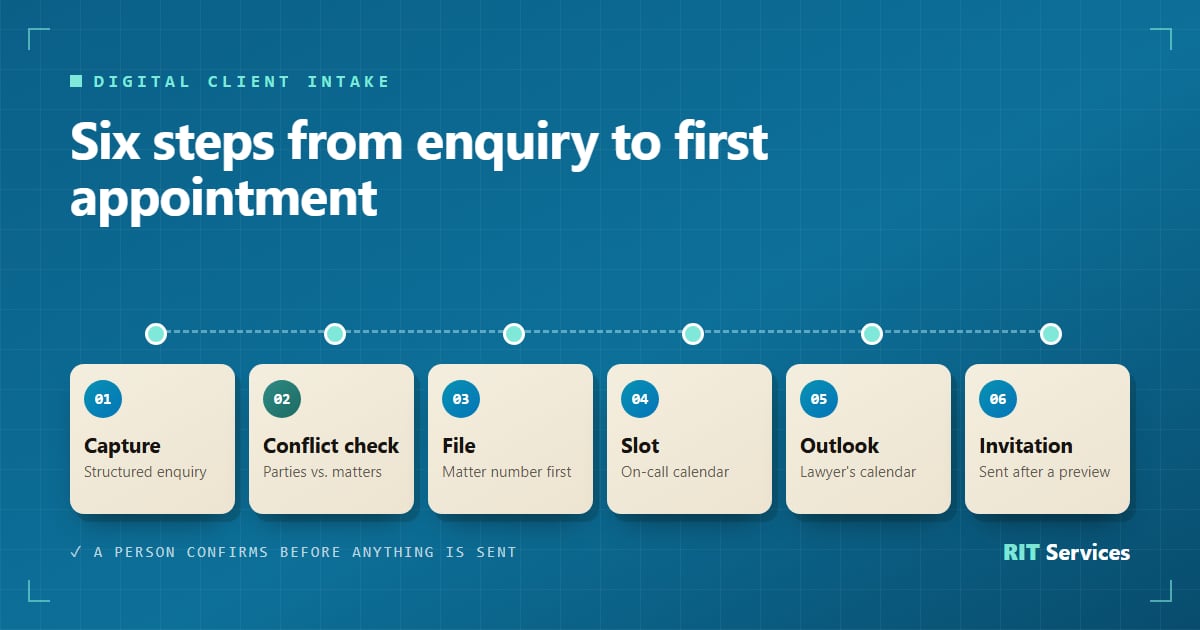
Where enquiries stall when intake is done by hand
Enquiries get lost at the hand-offs:
- Too many channels. Calls, emails, forms and referrals, and nobody owns the queue.
- Retyping. The same details go into practice software, calendar and invitation, each copy a chance for error.
- Unclear ownership. Who is on call today, and who handles this area of law?
- Calendars out of sync. The on-call calendar shows a free slot; the lawyer's Outlook calendar shows a court hearing.
- Missing facts. Is a deadline running, who is the opposing party? Otherwise someone has to call back.
- Silence. A prospect who hears nothing often calls the next firm.
What legal client intake software should automate: six steps
Workflow automation for law firms can start small. From enquiry to appointment, six building blocks do most of the work:
- Structured enquiry capture. One intake form defines what is asked every time: contact details, area of law, parties involved, opposing side, a short description, running deadlines and preferred dates. Phone and website use the same fields. The GDPR privacy notice belongs right here.
- A conflict check. Software matches the parties captured at intake against existing matters and flags any hits before a file is opened. The decision stays with the lawyer.
- A digital file from the start. The enquiry becomes a file without retyping.
- The first free slot in the on-call calendar. The system proposes the next available slot for whoever is on call.
- A check against the lawyers' Outlook calendars. This prevents double bookings.
- An automatic invitation. Time, location or video link and a document checklist go to the prospect once a person has approved the proposal.
Not sure which of these steps would save your firm the most time? Book a free initial consultation and we will look at your current intake process together.
Confidentiality and data protection come first
Automated legal intake handles exactly the information your duty of confidentiality protects. For firms in Germany, three rules matter. The duty of confidentiality under Section 43a(2) BRAO covers everything a lawyer learns in the course of practice. Section 43e BRAO sets the conditions for using external service providers: careful selection, a contract in text form and a confidentiality undertaking that explains the criminal consequences of a breach. Section 203(3) of the German Criminal Code allows disclosure to people who contribute to the lawyer's work only to the extent required. You will usually also need a data processing agreement under Art. 28 GDPR.
In practice: hosting in EU data centres or on your own infrastructure, role-based access and two-factor authentication. This is not legal advice; agree the details with your data protection officer.
Off-the-shelf tool or custom client intake software for law firms?
Not every firm needs bespoke law firm automation software. A standard tool is usually enough when:
- you work from one office with one shared calendar,
- there is no on-call rota with changing responsibilities,
- the vendor's form and booking feature fit your process.
A custom build tends to pay off when:
- an on-call calendar and individual Outlook calendars have to work together,
- your practice area needs specific details at intake, such as the authorities involved and their references,
- enquiries should flow straight into systems you already run, such as Microsoft 365 or SharePoint,
- you want to own the source code.
If standard software covers your process, we will tell you.
From our Defensio project: before and after
Defensio is the software we built for a criminal-defence practice. Before: enquiries were captured in a form app and then copied by hand into other tools to create the file, appointment and first documents.
After: everything now runs in one system:
- Capture: every enquiry gets a reference number when it is created. The actual file number is only assigned once a file is opened, keeping enquiries without a matter separate. Authorities involved are recorded with location and reference.
- Slot and owner: the first free entry in the shared on-call calendar in Microsoft 365 sets both the appointment and the responsible lawyer. Entries in the lawyer's own Outlook calendar, such as a court date, block the slot.
- Invitation: for video calls, the system creates a Zoom meeting. Staff check a preview and send the invitation, including a calendar entry, from the firm's mailbox with one click. Reschedules and cancellations follow automatically.
- Documents: the documents for the matter are generated from the file data and filed automatically in the matter's SharePoint folder.
- Security: tiered roles for staff, lawyers and administrators, plus two-factor sign-in with an authenticator app.
The result: staff effort for client intake fell by 50 %, and the investment paid for itself after five months (source: RIT Services, results from real projects). The whole project is described in the Defensio case study.
Where to start
Start where most enquiries stall today, usually capture or scheduling. Our pilots usually go live within two to four weeks. See how we build software and automation for law firms.
Ready to speed up your client intake? Book a free initial consultation. We will tell you honestly whether an off-the-shelf tool is enough or a custom build is worth it.
FAQ: law firm client intake software
Which information should intake capture?
At least contact details, area of law, parties and opposing side, a short description, running deadlines and preferred dates. You need them for the conflict check, allocation and scheduling.
Can a German law firm use an external provider for client intake?
Yes, provided the requirements of Section 43e BRAO are met: careful selection, a contract in text form and a confidentiality undertaking. A data processing agreement under Art. 28 GDPR is usually needed as well.
Does automation replace a lawyer's review?
No. The software collects information and proposes slots; a conflict match can flag hits. Deciding whether to take on the matter stays with you.
Does it work with Outlook?
Yes. In our Defensio project, slot search uses the shared on-call calendar in Microsoft 365 and the lawyers' own Outlook calendars.
How quickly can a solution go live?
A first pilot usually goes live within two to four weeks. Scope depends on how many systems are connected.